Chat with ChatGPT, your way — branching, not linear.
Sign in with your own ChatGPT account and explore ideas on a canvas. Fork any reply into a new branch instead of losing your place in one long thread.
No API key, ever
Sign in with your own ChatGPT account. Every request runs on your plan and usage limits — you never hand over an OpenAI API key.
Non-linear conversations
Every reply can branch. Fork a conversation from any message, or select a snippet of text and branch from that exact point.
Tokens never leave the server
Your browser only ever holds a signed, HttpOnly session cookie. Access and refresh tokens stay inside the backend handler.
Streamed, formatted responses
Replies stream in token by token and render as proper Markdown — code blocks, tables, and lists included.
How it works
- Step 1
Enable device code sign-in
Turn on device code authorization for Codex in your ChatGPT account settings.
- Step 2
Sign in with ChatGPT
Authorize this app on OpenAI's verification page using a short device code.
- Step 3
Chat and branch
Pick a model, start chatting, and fork any message into a new branch whenever you want to explore a different direction.
One-time setup required
- 1.ChatGPT → Settings
- 2.Security and login
- 3.Under "Secure sign in with ChatGPT", enable "Device code authorization for Codex"
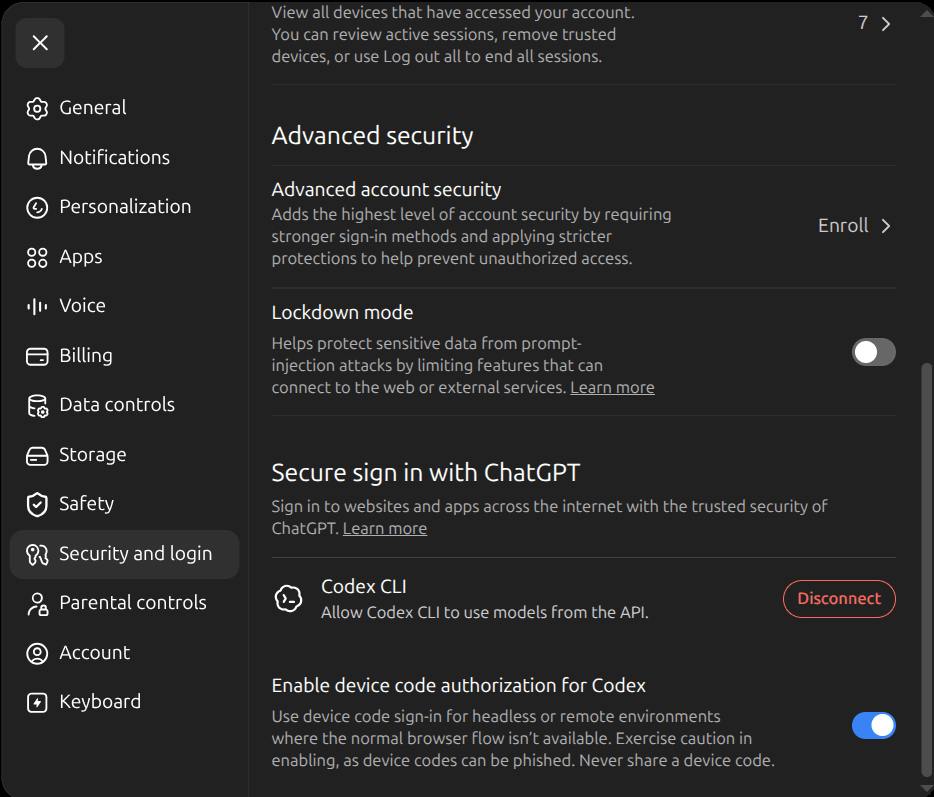
Device code sign-in is for headless or remote environments where the normal browser flow isn’t available. Exercise caution enabling it, as device codes can be phished. Never share a device code.